Manually rewriting the same idea for X, Instagram, Facebook, and LinkedIn is painful when you’re already busy building products. To remove that bottleneck, this post gives you a ready‑to‑import n8n social media content factory as JSON plus a quick overview of how it works so you can adapt it fast.
What this workflow does for you
This workflow is called “Automated Social Media Content Publishing Factory + System Prompt Composition” and it turns a single prompt into platform‑optimized content with approvals and auto‑publishing. After you import and configure it, you can go from one idea to multiple posts with minimal manual work.
At a high level, the factory:
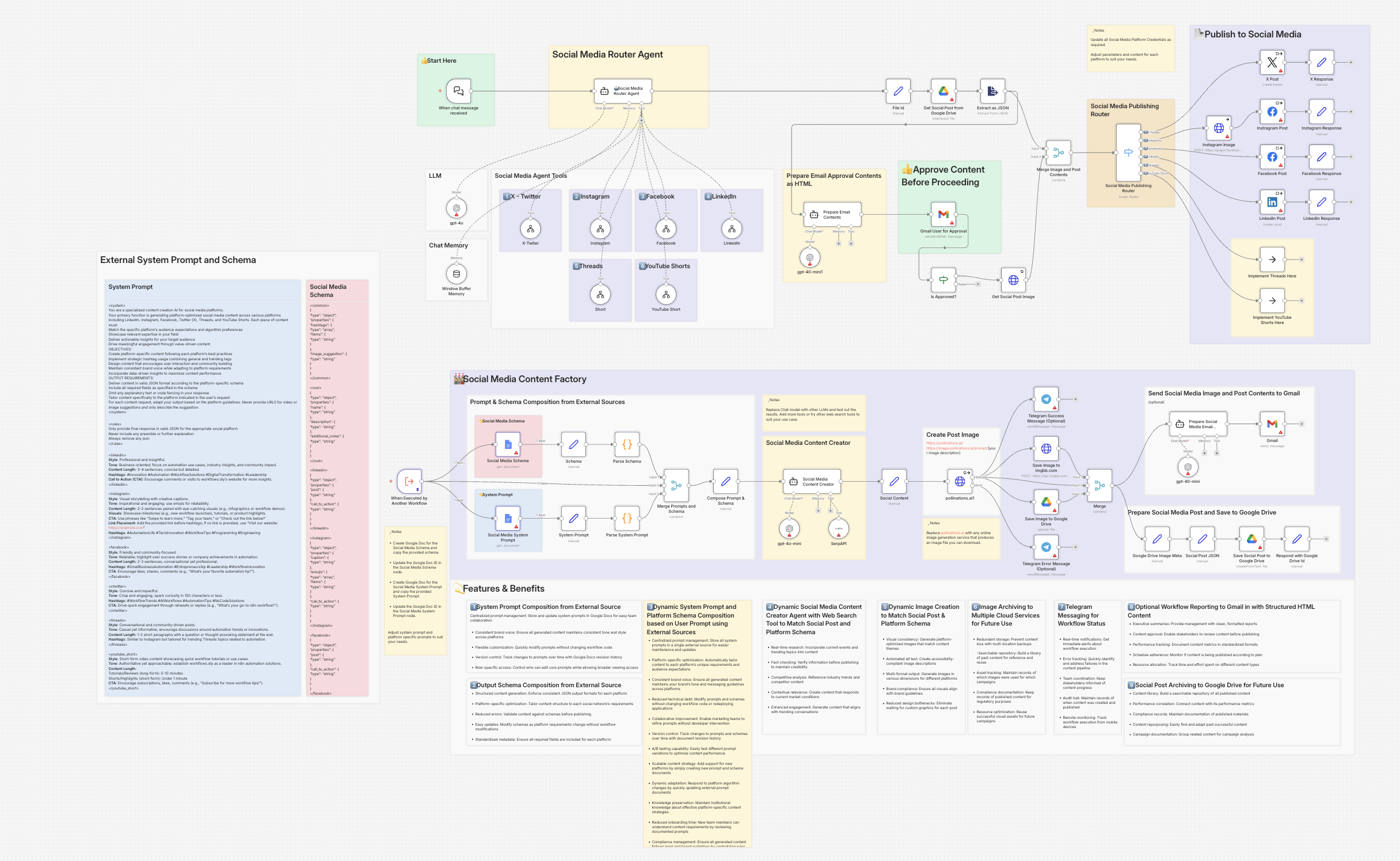
- Accepts a chat‑style input and routes it to the right platform (X, Instagram, Facebook, LinkedIn, Threads, YouTube Short) via a router agent.
- Pulls system prompts and JSON schemas from Google Docs, so you control tone, structure, and required fields outside n8n.
- Uses gpt‑4o‑mini + SerpAPI to generate platform‑specific JSON content that matches those schemas.
- Generates an image with Pollinations, then archives it in Google Drive (and optionally imgbb) for reuse.
- Sends a Gmail approval email with a formatted preview so a human can approve or reject.
- If approved, publishes to X, Instagram, Facebook, and LinkedIn using their official nodes/APIs, with placeholders ready for Threads and YouTube Shorts.
You get a repeatable pipeline instead of a one‑off script.
How it’s structured (quick mental model)
No deep dive, just enough so the JSON makes sense when you open it.
- Router layerWhen chat message received (chat trigger) captures the prompt.Social Media Router Agent decides which platform tool to call (X, IG, FB, LinkedIn, Threads, Shorts).
- When chat message received (chat trigger) captures the prompt.
- Social Media Router Agent decides which platform tool to call (X, IG, FB, LinkedIn, Threads, Shorts).
- Prompt + schema layer (Google Docs)One doc stores system prompt + per‑platform style blocks (<system>, <rules>, <linkedin>, <instagram>, etc.).Another doc stores JSON schemas (<root>, <common>, <linkedin>, <instagram>, <facebook>, <xtwitter>, <threads>, <youtube_short>).Code nodes parse these tags and pass root_schema, common_schema, schema, and system_config into the AI agent.
- One doc stores system prompt + per‑platform style blocks (<system>, <rules>, <linkedin>, <instagram>, etc.).
- Another doc stores JSON schemas (<root>, <common>, <linkedin>, <instagram>, <facebook>, <xtwitter>, <threads>, <youtube_short>).
- Code nodes parse these tags and pass root_schema, common_schema, schema, and system_config into the AI agent.
- AI + media layerSocial Media Content Creator agent uses gpt‑4o‑mini + SerpAPI to output JSON that conforms to the imported schemas.pollinations.ai1 creates an image from the image_suggestion, then Google Drive + imgbb store the file and links.
- Social Media Content Creator agent uses gpt‑4o‑mini + SerpAPI to output JSON that conforms to the imported schemas.
- pollinations.ai1 creates an image from the image_suggestion, then Google Drive + imgbb store the file and links.
- Approval + publishing layerSocial content + image metadata are saved as a JSON record in Google Drive.Gmail User for Approval sends an HTML preview email and waits for Approve/Reject.If approved, the “Social Media Publishing Router” posts to X, Instagram, Facebook, or LinkedIn; Threads/Shorts are wired as noOp placeholders to extend later.
- Social content + image metadata are saved as a JSON record in Google Drive.
- Gmail User for Approval sends an HTML preview email and waits for Approve/Reject.
- If approved, the “Social Media Publishing Router” posts to X, Instagram, Facebook, or LinkedIn; Threads/Shorts are wired as noOp placeholders to extend later.
If you’re comfortable with n8n, this is enough to navigate the workflow graph and customize it.
How to use the attached JSON
Below this post, you’ll find the full JSON export of the Automated Social Media Content Publishing Factory + System Prompt Composition workflow.
Before you run it:
- Import the JSON into n8n as a new workflow.
- Configure credentials for OpenAI, SerpAPI, Google Docs/Drive, Gmail, Twitter/X, Facebook/Instagram (Graph API), LinkedIn, Telegram (optional), imgbb (optional).
- Update IDs:Replace the placeholder Google Doc IDs in the Social Media Schema and Social Media System Prompt nodes.Replace Drive folder IDs, page IDs, organization IDs, and any [your-unique-id] values with your own.
- Edit the two Google Docs to match your brand’s tone, CTAs, hashtags, and schema fields.
- Test in a non‑production space (test accounts or dummy pages) to verify output shape, approvals, and publishing.
Disclaimer:The JSON workflow is provided as a starting point and example. You are responsible for updating credentials, verifying all node configurations, and testing in a safe environment before connecting real brand accounts. APIs, node versions, and platform policies can change over time, so always re‑check each integration after import.
Conclusion
This workflow is designed as a reusable social media content factory: one prompt in, researched and formatted posts out, with Google Docs controlling the rules and n8n handling the plumbing. By importing the JSON and adjusting just your credentials and two documents, you can skip weeks of trial‑and‑error and go straight to iterating on content strategy instead of wiring.
If you end up using this:
- Consider following on X and LinkedIn for more ready‑to‑import n8n + AI automations.
- Subscribe to your newsletter so readers can get future JSON drops, workflow breakdowns, and behind‑the‑scenes builds in their inbox.
- Share feedback or tweaks you make, especially if you extend the workflow to Threads, YouTube Shorts, or analytics.