
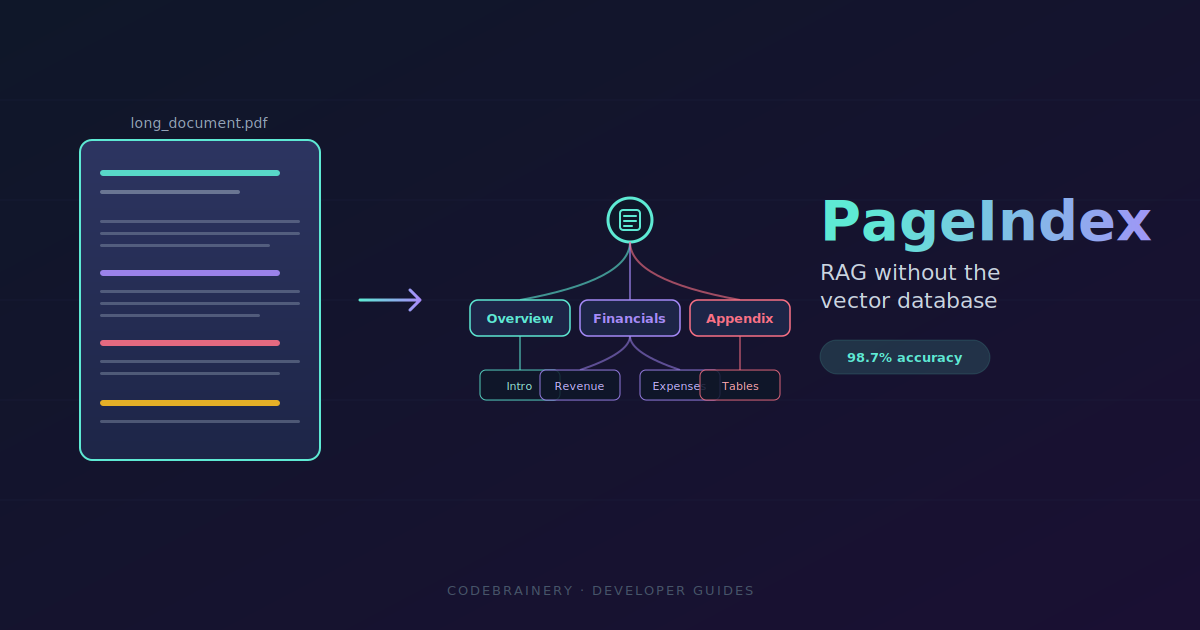
For two years, every RAG tutorial said the same thing. Chunk your docs, embed them, dump them in Pinecone or Chroma, run cosine similarity, hope the top-k is right.
Then a small team called Vectify AI threw the whole pipeline out and hit 98.7% on FinanceBench, the benchmark that has been quietly humbling vector RAG for years.
No embeddings. No chunking. No vector DB. They call it PageIndex, and it works the way you actually read a 200-page report: open the table of contents, jump to the section that probably has the answer, scan, jump again if needed.
Here's what it is, why it works, and a 10-line Python example you can run today.
The problem with the standard RAG stack
Vector RAG looks neat on a slide deck. In production with long structured documents like 10-Ks, contracts, regulatory filings, and technical manuals, it leaks in five obvious places:
- Chunks slice through meaning. A 512-token window doesn't care about paragraph boundaries. Half a thought ends up in chunk 47, the other half in chunk 48.
- Similar text isn't relevant text. In a financial filing, fifty paragraphs all sound like "we recognized revenue of..." Cosine similarity can't tell the right one from the noise.
- Cross-references die silently. A query about deferred assets might need data in Appendix G, but Appendix G has zero semantic similarity to the query, so it never gets retrieved.
- No reasoning trace. When retrieval misses, you get a wrong answer with no breadcrumbs to explain why.
- Infra cost. Embedding models, vector storage, similarity search, reindex pipelines. All for documents that already have a perfectly good structure called "headings."
Even Anthropic's Claude Code moved away from vector RAG for code retrieval. Same idea applies to documents.
What PageIndex actually does
PageIndex builds a hierarchical tree from your document, basically a souped-up table of contents, then lets an LLM walk that tree to find answers. No embeddings anywhere in the pipeline.
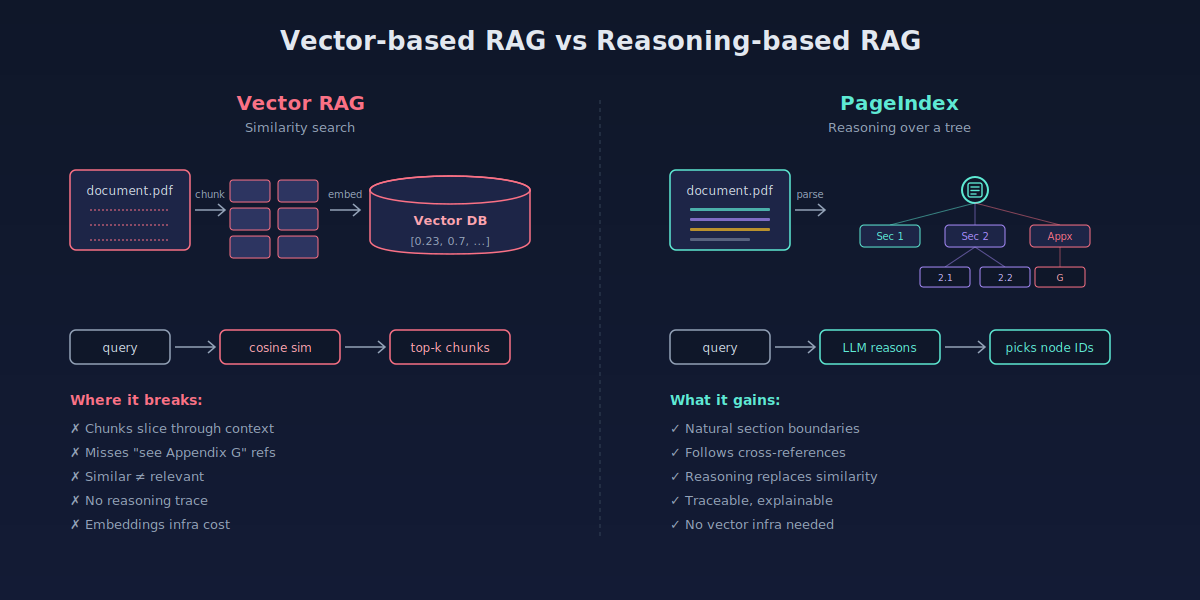
The tree is JSON. Each node has an ID, a title, a summary, and a pointer to the raw text:
{
  "node_id": "0006",
  "title": "Financial Stability",
  "start_index": 21,
  "end_index": 22,
  "summary": "The Federal Reserve's framework for...",
  "sub_nodes": [
    {
      "node_id": "0007",
      "title": "Monitoring Vulnerabilities",
      "start_index": 22,
      "end_index": 28,
      "summary": "Quarterly reviews covering..."
    }
  ]
}
The Vectify AI team calls this an in-context index. Instead of an external vector store, the index lives inside the LLM's context window. The model can read it, reason about it, and decide where to look next, all in one pass.
The reasoning loop
When a query comes in, PageIndex doesn't do similarity search. It runs a small reasoning loop the way a human would.
- Read the ToC. The LLM sees node titles and summaries, not raw text.
- Pick a likely node. "Debt trends are usually in the financial summary or Appendix G, so start there."
- Pull the raw content from that node only.
- Decide if it's enough. If yes, answer. If no, jump back to step 1 and try a different branch.
- Generate the answer with citations pointing to the exact node IDs used.
This is why cross-references work. When the LLM reads "see Appendix G" inside the section it's currently looking at, it just navigates there. The reference becomes a useful signal instead of a missed one.
Try it in 10 lines
PageIndex is open-source on GitHub with a hosted API and an MCP server. The Python SDK is on PyPI. Install it:
pip install -U pageindexGet an API key from the PageIndex dashboard, then:
from pageindex import PageIndexClient

client = PageIndexClient(api_key="YOUR_API_KEY")

# 1. Submit a long PDF
result = client.submit_document("./annual-report-2023.pdf")
doc_id = result["doc_id"]

# 2. Wait for tree generation, then ask
response = client.chat_completions(
    messages=[{
        "role": "user",
        "content": "What was the total deferred asset value, including any appendix data?"
    }],
    doc_id=doc_id,
)

print(response["choices"][0]["message"]["content"])
That's it. No embedding model to pick, no vector DB to spin up, no chunk size to tune.
If you want to inspect the tree itself, useful for debugging or building your own retrieval logic on top, pull it directly:
tree = client.get_tree(doc_id)["result"]
print(tree)  # the full hierarchical JSON
You can also self-host the engine and pair it with the OpenAI Agents SDK for a fully agentic vectorless RAG. The repo has a working agentic_vectorless_rag_demo.py example.
Where it shines (and where it doesn't)
PageIndex is built for one specific shape of problem: long, structured documents where reasoning matters more than recall speed. Annual reports, SEC filings, clinical protocols, legal contracts, dense technical manuals.
A few honest trade-offs to know before you swap your stack:
| Use case | Better choice |
|---|---|
| 200-page financial reports | PageIndex |
| Cross-reference-heavy legal docs | PageIndex |
| Auditable retrieval (you need the trace) | PageIndex |
| Millions of short FAQ snippets | Vector DB |
| Sub-100ms latency on cheap hardware | Vector DB |
| Documents with no real structure | Vector DB |
The team behind it doesn't pretend reasoning RAG kills vector RAG. The future is probably hybrid. Use the right index for the document shape you actually have.
Why this matters now
We've spent two years optimizing the wrong thing. Better embedding models, smarter chunkers, hybrid BM25 fusions, all chasing accuracy on long documents that vector search was never built for.
PageIndex flips the question. Instead of asking "which chunk is most similar to my query," it asks "where would a human look first?" That single shift takes FinanceBench from the mid-80s to 98.7%, with retrieval you can actually explain to a compliance team.
If you're working with long professional documents, this is worth a Saturday afternoon.
FAQ
Is PageIndex free? The open-source repo is free and self-hostable. The hosted Cloud API has a free tier (1,000 pages on signup) and paid plans for OCR-heavy workloads.
Does it support scanned PDFs? Self-hosted is optimized for text PDFs. The Cloud API includes OCR for scanned and complex documents.
Which LLMs work with it? The reference implementation uses GPT models. The Cloud API runs the reasoning loop server-side, so you don't pick the model directly. The open-source code is straightforward to retarget at Claude, Gemini, or local models.
Can it replace my vector DB entirely? For long structured documents, often yes. For short snippet retrieval at scale, keep the vector DB. Many production systems will end up running both.
Wrap up
Vector RAG isn't dead, but it's no longer the default answer for every retrieval problem. PageIndex shows that for long documents, reasoning over structure beats searching by similarity, and you don't need a vector database to get there.
Spin it up on a 10-K you've been struggling to query well. The first time it nails an Appendix G cross-reference your old pipeline kept missing, you'll get it.
Got your own take on this?
Built something cool with PageIndex, or shipped a hybrid setup that mixes it with vector search? Write it up and publish on codebrainery.com. We're building a home for builders who actually ship.