About half of the code Claude writes for you has a security bug in it. That's not a hot take. Anthropic's own benchmark on Claude Opus 4.5 shows it produces secure code only 56% of the time when you don't explicitly prompt for security. CodeRabbit's analysis is bleaker still. AI code is 2.74× more likely to introduce XSS than what humans write.
So if you're shipping AI-generated code without a scanner watching it, you're shipping vulnerabilities. Fast.
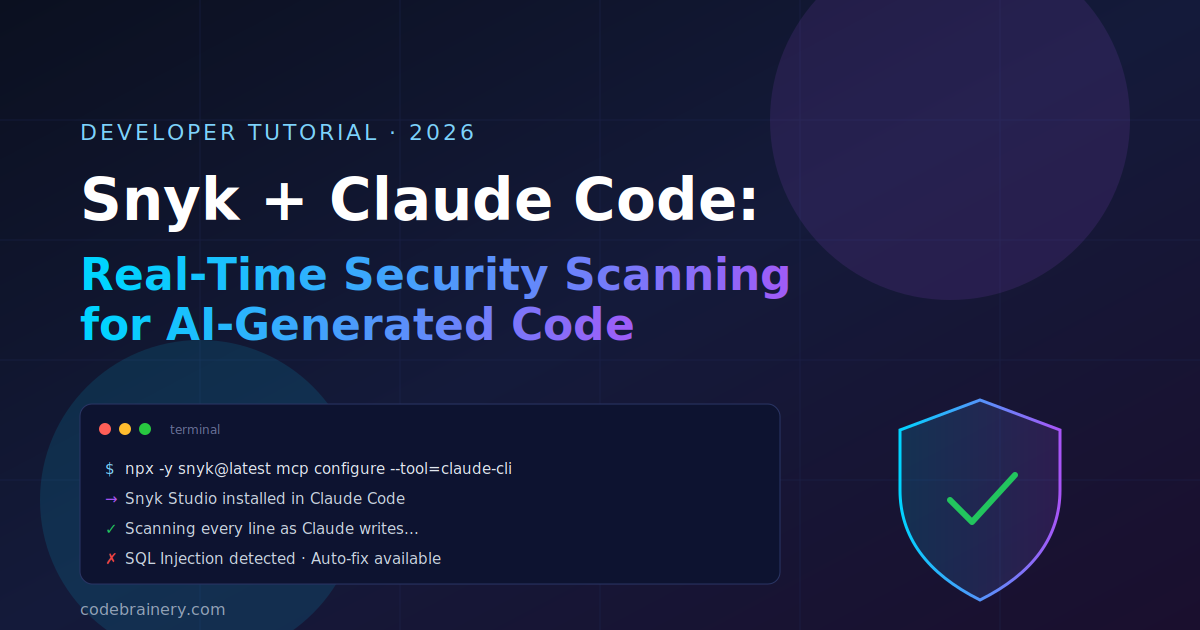
The fix is simpler than you'd think: bolt Snyk onto Claude Code as an MCP server. Snyk scans every chunk of code Claude writes, in your terminal, in real time. Catches bugs before they touch git. Suggests the fix. Re-scans to prove it worked.
This is a 60-second install and a workflow that genuinely changes how I ship AI code. Here's how it works.
Why this combo matters in 2026
A quick reality check on where we are:
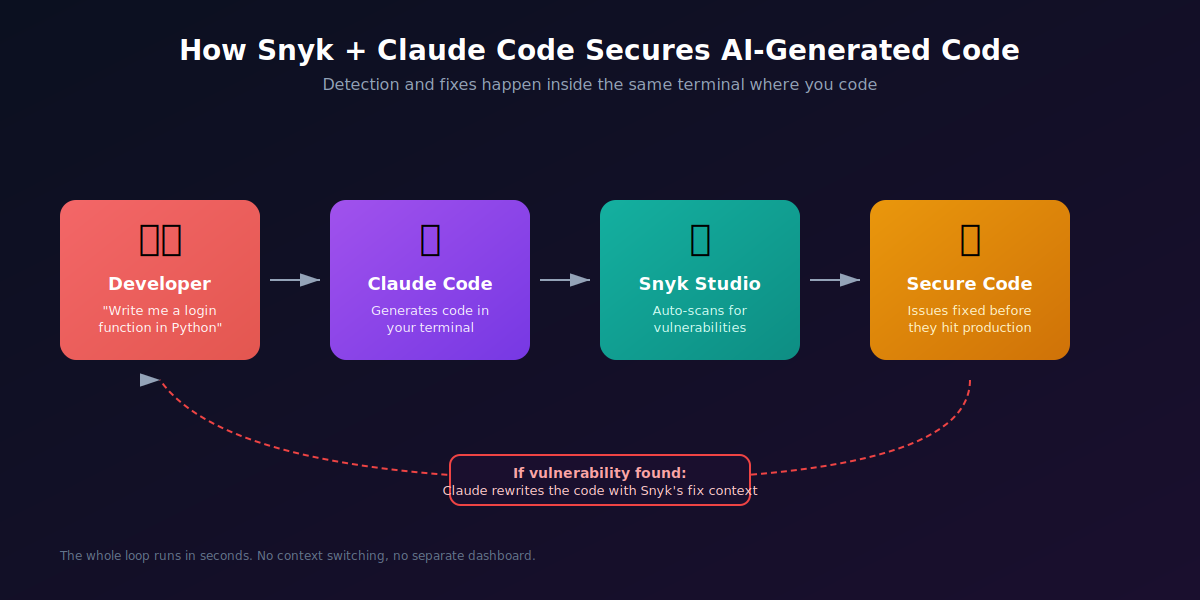
Snyk's 2026 State of Agentic AI Adoption Report, pulled from over 500 enterprise environments, found that 65 to 70 percent of production code is now AI-generated, and roughly half of that contains vulnerabilities. JPMorganChase's tech leadership team called embedding security into the AI dev lifecycle one of the most critical actions enterprises must take this year.
The old workflow was: write code, push to CI, wait for the SAST scanner, get a Slack ping three hours later, context-switch back into the broken file. With AI assistants, that loop is too slow. You're generating 200 lines per minute. The scanner needs to be inside the loop, not after it.
That's exactly what Snyk Studio does inside Claude Code. It runs as an MCP server. Every time Claude writes code, Snyk scans it. Vulnerable? Claude rewrites it with Snyk's fix context baked in.
What you'll need
- Claude Code installed (npm install -g @anthropic-ai/claude-code or follow the official quickstart)
- Node.js with npx available
- A free Snyk account (no credit card needed for the developer tier)
- About 5 minutes for setup
Step 1: Install Snyk Studio in Claude Code
This is genuinely a one-liner. Open your terminal and run:
npx -y snyk@latest mcp configure --tool=claude-cliThree things happen:
- The latest Snyk CLI gets downloaded
- Snyk Studio is registered as an MCP server inside Claude Code
- Snyk's "Secure at Inception" rules are written into your global CLAUDE.md file, so Claude knows it should scan generated code
If npx isn't available in your environment, install the Snyk CLI directly first, then run the same configure command.
Step 2: Authenticate
The first time you trigger Snyk, it'll open a browser window for OAuth. Pick your login method (GitHub, Google, email — whatever), grant permissions, then close the browser and head back to your terminal.
You can sanity-check it from the Claude Code session:
snyk auth statusDone. You're wired up.
Step 3: Generate some code and watch Snyk catch a bug
Here's the demo Snyk uses in their official docs, slightly adapted. Drop this prompt into Claude Code:
Write a Python Flask endpoint that takes a username query parameter and looks up the user from a SQLite database. Return their email.
Claude will happily write something like this:
from flask import Flask, request, jsonify
import sqlite3

app = Flask(__name__)

@app.route('/user')
def get_user():
    username = request.args.get('username')
    conn = sqlite3.connect('users.db')
    cur = conn.cursor()
    # ❌ Vulnerable: string concatenation into SQL
    query = f"SELECT email FROM users WHERE username = '{username}'"
    cur.execute(query)
    row = cur.fetchone()
    conn.close()
    return jsonify({"email": row[0] if row else None})
That's a textbook SQL injection. With Snyk Studio active, Claude doesn't stop at "here you go." It calls snyk_code_scan on the file. Snyk flags it as High severity — SQL Injection: unsanitized input flows into SQL query. Claude reads the finding and offers a fix:
from flask import Flask, request, jsonify
import sqlite3

app = Flask(__name__)

@app.route('/user')
def get_user():
    username = request.args.get('username')
    conn = sqlite3.connect('users.db')
    cur = conn.cursor()
    # ✅ Parameterized query — Snyk-approved
    cur.execute("SELECT email FROM users WHERE username = ?", (username,))
    row = cur.fetchone()
    conn.close()
    return jsonify({"email": row[0] if row else None})
Claude then re-runs the scan to confirm the issue is gone. Total round trip: usually under 30 seconds.
How the scan-fix-verify loop actually works
Here's the mental model:
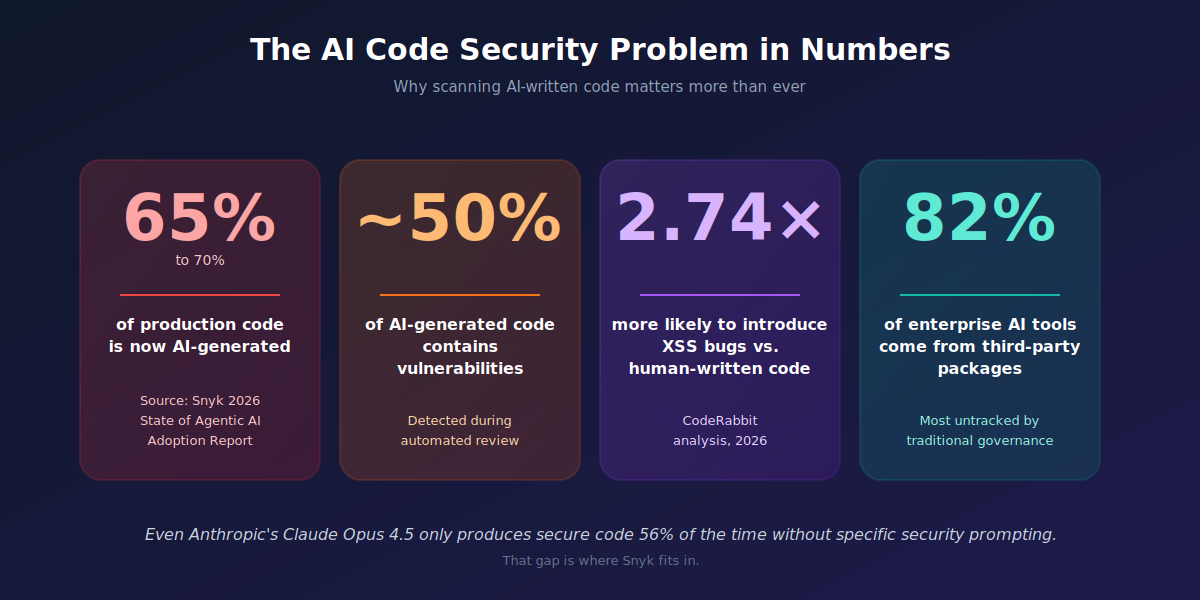
The Snyk MCP server exposes around 11 tools to Claude. Things like snyk_code_scan (SAST for your code), snyk_test (dependency / SCA scanning), snyk_iac_scan (Terraform, K8s configs), and snyk_auth_status. Claude picks the right tool for the file type it's working on.
The default rule installed in your CLAUDE.md is straightforward:
BEFORE declaring task complete:
- Run snyk_code_scan when significant first-party code changes
- If vulnerabilities are found, attempt to fix using Snyk's results
- Re-scan to verify the fix
You can tighten or loosen this. Some teams switch to "smart scan" mode, where Claude only scans when it judges the change risky. Lower token usage, faster iteration, slightly higher chance of missing something. Pick your poison.
A real example: scanning an existing project
Snyk runs a demo using pyGoat, OWASP's intentionally-vulnerable Django app. A developer asks Claude:
Please run a code scan on ~/projects/pygoat.
Claude trusts the directory, runs snyk_code_scan, and surfaces something like:
✗ [High]   SQL Injection            introduction/views.py:871
✗ [High]   Path Traversal           introduction/file_handler.py:42
✗ [Medium] Hardcoded Credentials    introduction/playground/A9/api.py:17
✗ [Medium] CSRF Protection Disabled introduction/views.py (27 instances)

Total: 101 issues — 15 High, 44 Medium, 42 Low
Now you say: "Fix the SQL injection on line 871, then re-scan." Claude rewrites the vulnerable string-concat query into a parameterized one, runs Snyk again, and confirms the issue count dropped from 101 to 100. The specific finding is gone. No tab-switching. No PR cycle. No three-hour wait.
Things to actually be careful about
Honest take, since I've broken a few things: this isn't a magic shield. A few gotchas worth knowing:
MCP servers run on your laptop. A vulnerable third-party MCP server is itself an attack surface. Snyk has written about command-injection bugs in MCP servers. Stick with the official Snyk MCP server. Don't grab random ones from npm.
SAST is not DAST. Snyk Studio scans source code. It won't catch runtime issues, broken auth flows in deployed apps, or business-logic bugs. You still need integration tests and a real DAST tool for production.
The free tier has limits. Brian Reich, a dev who blogged about wiring this up, hit API rate limits on Snyk's organizational plan. If you scale this across a team, budget for a real Snyk seat.
Claude can over-fix. I've seen Claude refactor surrounding code "while it's there" and break unrelated tests. Always run your test suite after a Snyk fix. Always.
Frequently asked questions
Does this work with Claude in the browser, or only Claude Code? Snyk Studio is for Claude Code (the CLI) and Claude Desktop. The web UI doesn't run MCP servers locally.
Will it scan my dependencies too, or just code I write? Both. snyk_test covers your package.json, requirements.txt, go.mod, etc., and flags known CVEs.
How is this different from Claude Code Security (Anthropic's own tool)? Anthropic's tool is great at deep reasoning over a whole repo and finding novel zero-days. Snyk is faster, deterministic, and catches the boring-but-common stuff: SQLi, XSS, hardcoded secrets, vulnerable deps. Most teams need both.
Does Snyk send my source code to its servers? Snyk Code uses cloud-based analysis by default. If that's a problem for your org, check out their on-prem or self-hosted options.
What to try next
You've got the basics. Now:
- Add the Snyk rule to a real project's CLAUDE.md
- Try snyk_iac_scan on your Terraform — it catches misconfigured S3 buckets, exposed databases, and IAM mistakes
- Look into Remediation Directives — /snyk-fix as a single command that triages, fixes, and opens a PR
The shift here is real. Security stops being a separate ticket queue. It becomes a thing your AI assistant just handles, in the same conversation where you're shipping features.
Built something cool with Snyk + Claude Code? Wrote your own walkthrough? Share it with other builders on codebrainery.com — we're always looking for community articles from devs in the trenches.