

Becoming an Agentic AI Engineer in a short time frame is achievable if you focus on practical application rather than theoretical learning. Start by developing a narrow Python agent, add retrieval and guardrails, and validate your work with logs and repeatable tests. The common pitfall is neglecting practical application in favor of theoretical learning.
What you'll learn
- Build a Python agent that uses real tools
- Add retrieval and guardrails to your agent
- Troubleshoot common Agentic AI failures
- Package a project for hiring teams
Start with the skills this role actually needs
Set your bar for the role before you build anything. Agentic AI refers to systems that pursue a goal by planning, reasoning, and taking multi-step actions, according to fda.gov.
A general AI engineer can work across models, training, and broad AI systems. An Agentic AI engineer builds systems around models so they can complete real tasks with data, tools, memory, and guardrails reliably.
You do not need a machine learning background. You do need software basics, because this work combines programming, APIs, databases, automation, cloud, security, and evaluation.
An API is a defined way for one software system to ask another system to do work.
Prerequisites checklist
- [ ] You can write basic Python and use a terminal
- [ ] You can call an API from code and handle results
- [ ] You can read logs and debug simple backend failures
- [ ] You can work with data, security basics, and cloud services
Build one small agent that can use a real tool
Python first. Python is a programming language, and it is one of the most useful languages for AI application development.
Use one starter project: a support agent that answers account questions by calling one weather API for service-status context, with one model and one success condition. According to mylearnnest.com, agentic AI systems can take a goal, plan tasks, use external tools, and complete workflows. For you, that means the build must actually call something outside the model.
Minimal build
Tool calling means the model can choose a named external function, pass arguments to it, and use the result in its reply.
# app.py
from openai import OpenAI
client = OpenAI()

tools = [{
    "type": "function",
    "function": {
        "name": "get_status",
        "description": "Return current service status for a region",
        "parameters": {
            "type": "object",
            "properties": {"region": {"type": "string"}},
            "required": ["region"]
        }
    }
}]

resp = client.responses.create(
    model="gpt-4.1-mini",
    input="Is service normal in eu-west? If not, say escalate.",
    tools=tools
)
print(resp)
Set the success condition before you run it: when asked about a region, the agent must call get_status and return either “normal” or “escalate.” Businesses are increasingly interested in systems that can use tools and complete workflows. Next, replace the stub with a real API or shell command and log each call.
Add retrieval, guardrails, and a human handoff
Agentic systems are expected to retrieve information and complete workflows, so add retrieval before you add more autonomy. Retrieval-augmented generation (RAG) means your agent pulls needed facts from your own sources at run time before it answers, and according to agilefever.com, mastering it improves business-ready systems.
Guardrails are built-in rules that limit what the agent can do and when it must stop. Human oversight means a person reviews or approves risky actions, and FDA reported agentic systems use built-in guidelines, including human oversight, for reliable outcomes.
Second-stage build checklist
- [ ] Add RAG to one narrow task before adding new tools or longer plans
- [ ] Set action limits for writes, deletes, spending, and external calls
- [ ] Require human approval for irreversible or high-impact actions
- [ ] Log retrieved sources, actions taken, and handoff reasons
When the agent fails, read the symptom first
context_window=full failures are common in agentic AI because the system acts through a sequence of steps, according to mylearnnest.com. The context window is the amount of text the model can consider at once. When your prompt, retrieved notes, and tool output exceed it, the model drops details or answers from stale state.
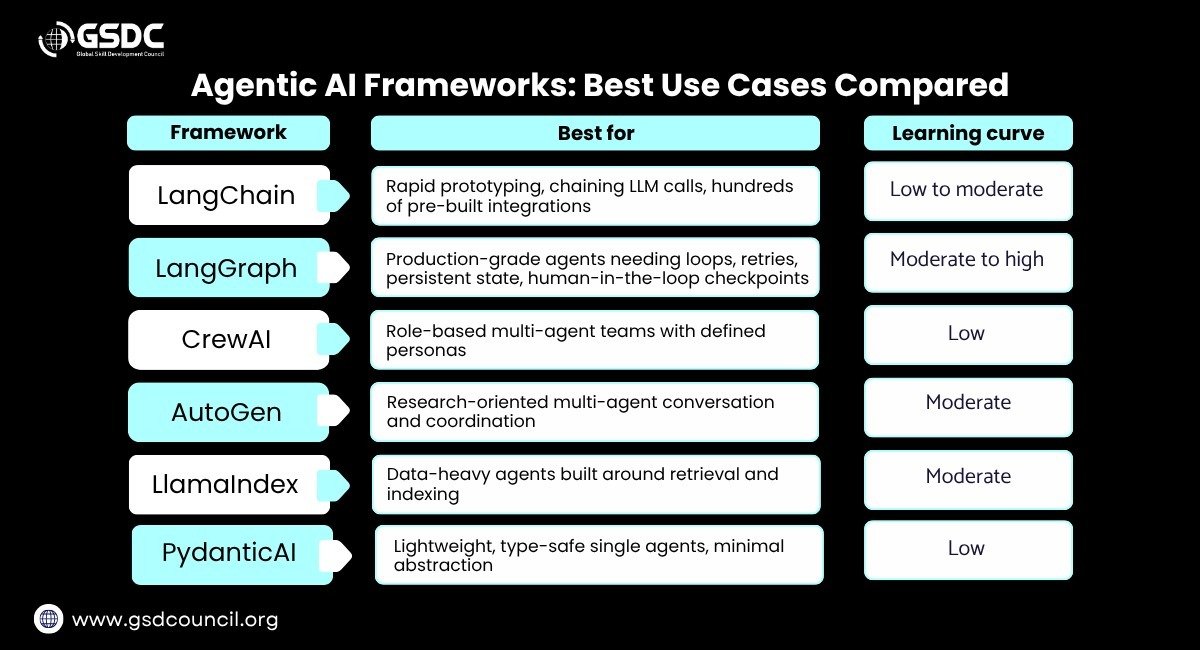
Troubleshooting FAQ
Q: The agent says it “found nothing,” even though the document exists.
A: Your retrieval is weak or returning the wrong chunks. Cut chunk size, improve the query, and print the top results before generation.
Q: The tool call keeps failing with permission errors.
A: The agent can plan steps and use external tools, but the runtime still needs valid scopes and credentials. Test the tool outside the agent first, then grant only the needed action.
Q: The agent repeats the same action forever.
A: Your stop condition is vague. Add a max-steps limit, detect duplicate actions, and require a final answer state before another tool call.
Turn the demo into work you can show hiring teams
2026 is the bar you should package for: an Agentic AI Engineer spans software, APIs, databases, automation, cloud, security, and evaluation, which means checking outputs against expected behavior with repeatable tests, according to mylearnnest.com.
Hiring teams want proof of orchestration, the code that coordinates model calls, tools, and handoffs into one working flow. Organizations are investing heavily in agent-based systems, so your evidence should look like deployable work, not a notebook demo.
- [ ] Ship one project people can run without your help
- [ ] Log every action, cost, and outcome in one place
- [ ] Add a short write-up with goal, architecture, failures, and fixes
- [ ] Show deployment steps, config, and rollback notes
Use one shipped project plus one short write-up as your portfolio minimum. Then review the logs and tighten the next weak step.
Know which production failure you actually have
Agentic AI in production uses built-in guidelines and human oversight for reliable outcomes. Use that as your default design rule.
If your agent can take actions across a sequence, failures often come from system design, not the model alone. Latency is the delay between a request and the system’s response.
Troubleshooting FAQ
Q: The agent takes unsafe actions or touches the wrong system.
A: Your task boundary is too wide. Add guardrails, require human approval before risky actions, and cut the task to one approved workflow.
Q: Outputs are flaky. The same request behaves differently across runs.
A: The workflow is too open-ended. Narrow the task, pin the tool path, and add tests for expected actions and stop conditions.
Q: Cost or latency is high.
A: The agent is doing too many steps. Reduce tool calls, shorten the action chain, and test simpler plans first.
Follow this roadmap to become job-ready
- 1. Days 1–7: ship one narrow agent in Python, with one model and one real tool, and record a passing demo video plus repo README.
- 2. Days 8–21: add retrieval before any extra autonomy, then prove it with five saved queries and expected answers in your test folder.
- 3. Days 22–35: add action limits, approvals, and a human handoff, then run ten scripted tasks and save the logs for each result.
- 4. Days 36–49: break it on purpose with retrieval errors, bad tool permissions, and looping prompts, then write fixes and rerun the same tests.
- 5. Days 50–70: deploy it where another person can use it, and log actions, costs, latency, and outcomes for every session.
- 6. Days 71–84: package one shipped project and one short write-up, because organizations are investing heavily in agent-based systems.
- 7. By day 90, verify real use: according to fda.gov, more than 70% of staff used Elsa after deployment. Your proof is repeated successful runs by users beyond you.
This path works if you build and test, not collect courses
Focus on building and testing rather than collecting courses. Courses help less than a runnable project with orchestration, tool use, approvals, and failure fixes.
Next steps
- 1. Check the prerequisites first: basic Python, terminal use, API calls, debugging, data, security basics, and cloud services.
- 2. Ship one narrow Python agent with one model, one real tool, and one fixed success condition. Log every call.
- 3. Add RAG to one narrow task, then set action limits, require human approval for irreversible actions, and log handoffs.
- 4. Break the agent on purpose with weak retrieval, bad permissions, and looping prompts. Fix each issue and rerun the same tests.
- 5. Deploy one project another person can run, then package it with logs, costs, latency, outcomes, and a short write-up.
Sources
- 1. [FDA Expands Artificial Intelligence Capabilities with Agentic AI Deployment | FDA]( https://www.fda.gov/news-events/press-announcements/fda-expands-artificial-intelligence-capabilities-agentic-ai-deployment)