
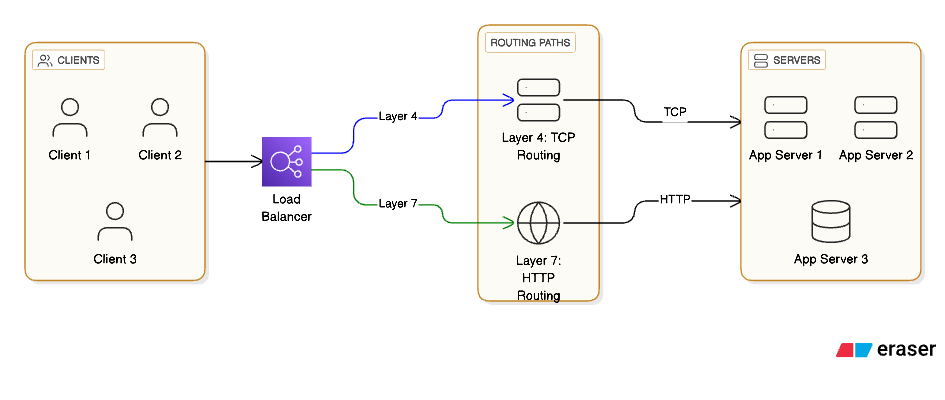
A load balancer is a critical building block in modern backend systems, acting as the smart traffic director that keeps applications fast, reliable, and horizontally scalable.
What is a load balancer?
At its core, a load balancer sits between clients and a pool of backend servers and decides which server should handle each incoming request.Instead of all users hitting one machine, the load balancer spreads traffic across many instances, which removes single points of failure and allows you to scale out by simply adding more servers behind it.
A simple mental model:
- Without load balancer:Users → app-server-1If that server crashes or gets overloaded, everyone sees errors or timeouts.
- Users → app-server-1
- If that server crashes or gets overloaded, everyone sees errors or timeouts.
- With load balancer:Users → Load Balancer → app-server-1 / app-server-2 / app-server-3If one server dies, the others keep serving traffic while you fix or replace the failed node.
This pattern shows up everywhere: SaaS apps, e‑commerce sites, streaming platforms, APIs, and microservice backends all lean on some form of load balancing.
How load balancers work (step by step)
When a request arrives, the load balancer performs a series of actions before the backend even sees it.
- Receive the client requestThe client connects to a virtual IP or DNS name like api.myapp.com, which actually points to the load balancer, not to a single server.
- Pick a healthy backendThe load balancer maintains a list of registered backend instances and periodically runs health checks (HTTP pings, TCP checks, or custom probes).Only servers that pass health checks are considered “healthy” and eligible to receive new traffic.
- Apply a balancing algorithmBased on a configured strategy, the load balancer chooses one backend from the healthy pool: round robin, least connections, IP hash, or some weighted variant.
- Forward the requestAt Layer 4, it just forwards TCP/UDP packets to the chosen server’s IP and port; at Layer 7, it may terminate TLS, inspect HTTP headers, and then forward a new HTTP request to the backend.
- Return the responseThe backend processes the request and sends a response back to the load balancer, which then returns it to the client, often keeping the client unaware of which server actually handled it.
Types of load balancers
Load balancers can be categorized in two important ways: by deployment model (software, hardware, cloud‑native) and by OSI layer (L4 vs L7).
By deployment model
- Software load balancersExamples: Nginx, HAProxy, Envoy, Traefik, and many self‑hosted reverse proxies.You run them on your own VMs or bare‑metal servers, typically in front of your app nodes.Pros: Extremely flexible, scriptable, can be customized with plugins and custom routing logic.Common in Kubernetes as Ingress controllers and sidecars.
- Examples: Nginx, HAProxy, Envoy, Traefik, and many self‑hosted reverse proxies.
- You run them on your own VMs or bare‑metal servers, typically in front of your app nodes.
- Pros: Extremely flexible, scriptable, can be customized with plugins and custom routing logic.
- Common in Kubernetes as Ingress controllers and sidecars.
- Hardware load balancersHistorically provided by vendors as specialized appliances for high‑throughput enterprise networks.They often offload SSL/TLS, provide advanced L4/L7 features, and integrate with on‑prem networks.Pros: Highly optimized and reliable; cons: expensive, less cloud‑native and less elastic.
- Cloud‑native load balancersFully managed services from cloud providers: Elastic Load Balancing (AWS), Azure Load Balancer/Application Gateway, Google Cloud Load Balancing.They integrate tightly with autoscaling groups, VM sets, and Kubernetes clusters, and expose simple APIs for registration and health checks.You focus on configuring listeners, target groups, and rules, while the provider manages capacity and reliability.
- Fully managed services from cloud providers: Elastic Load Balancing (AWS), Azure Load Balancer/Application Gateway, Google Cloud Load Balancing.
- They integrate tightly with autoscaling groups, VM sets, and Kubernetes clusters, and expose simple APIs for registration and health checks.
- You focus on configuring listeners, target groups, and rules, while the provider manages capacity and reliability.
By OSI layer
- Layer 4 load balancers (Transport layer)Work with TCP/UDP connections using source/destination IPs and ports.They do not inspect HTTP headers or body; they are protocol‑agnostic at the application level.Example: AWS Network Load Balancer or a simple TCP proxy in front of a database cluster.Used when you need extreme performance, very low latency, or you are load‑balancing non‑HTTP protocols.
- Work with TCP/UDP connections using source/destination IPs and ports.
- They do not inspect HTTP headers or body; they are protocol‑agnostic at the application level.
- Example: AWS Network Load Balancer or a simple TCP proxy in front of a database cluster.
- Used when you need extreme performance, very low latency, or you are load‑balancing non‑HTTP protocols.
- Layer 7 load balancers (Application layer)Understand HTTP/HTTPS and can route based on URL path, hostname, headers, query params, or cookies.Enable advanced capabilities:Path‑based routing (/api vs /static)Host‑based routing (api.myapp.com vs admin.myapp.com)A/B testing and canary releasesWAF (Web Application Firewall) integration and header rewriting.Examples: AWS Application Load Balancer, Nginx acting as reverse proxy, Google HTTP(S) Load Balancing.
- Understand HTTP/HTTPS and can route based on URL path, hostname, headers, query params, or cookies.
- Enable advanced capabilities:Path‑based routing (/api vs /static)Host‑based routing (api.myapp.com vs admin.myapp.com)A/B testing and canary releasesWAF (Web Application Firewall) integration and header rewriting.
- Path‑based routing (/api vs /static)
- Host‑based routing (api.myapp.com vs admin.myapp.com)
- A/B testing and canary releases
- WAF (Web Application Firewall) integration and header rewriting.
- Examples: AWS Application Load Balancer, Nginx acting as reverse proxy, Google HTTP(S) Load Balancing.
Load‑balancing algorithms (with examples)
Choosing how to distribute requests is as important as choosing where to run the load balancer.
1. Round robin
- The load balancer cycles through the list of servers in order: request 1 → server A, request 2 → server B, request 3 → server C, request 4 → server A again, and so on.
- Works best when all servers have similar capacity and requests are roughly similar in cost.
- Example: A stateless REST API with three identical application servers behind an L7 load balancer.
2. Least connections
- The balancer counts active connections to each server and sends the next request to the one with the fewest.
- This helps when some requests are long‑lived (like streaming or WebSocket connections) or heavy, because those servers remain busy longer and will automatically receive fewer new requests.
- Example: A long‑polling API or chat service where some clients stay connected far longer than others.
3. IP hash
- Uses a hash function on the client’s IP address to choose a backend; the same IP usually ends up on the same server.
- Useful for session stickiness when you cannot centralize sessions: a user’s session remains on a particular server most of the time.
- Example: Legacy web app storing sessions in in‑memory state on each instance, without Redis or database‑backed sessions.
4. Weighted routing
- Each server is assigned a weight (e.g., server A weight 3, server B weight 1), and traffic is distributed proportionally.
- Use this when some servers are more powerful or closer to a given user region; you can also use weights to gradually shift traffic during canary releases.
- Example: Rolling out v2 of your service on a subset of instances and gradually increasing their weight from 10% to 50% to 100%.
Where load balancers are used (practical scenarios)
Load balancers show up in multiple layers of your architecture, not just in front of web servers.
1. Web servers and APIs
- A classic setup is a public HTTP(S) load balancer in front of multiple web or API instances.
- Example architecture:Users → Cloud HTTP Load Balancer → autoscaling group of app-service instances.The load balancer terminates TLS, enforces HTTPS, and forwards clean HTTP traffic to backend instances.
- You get horizontal scalability, blue‑green deployments, and the ability to drain traffic from nodes before maintenance.
2. Microservices and Kubernetes
- In Kubernetes, Services of type LoadBalancer expose a stable external endpoint, while Ingress controllers act as Layer 7 load balancers, routing requests to different services by path or hostname.
- Example:https://myapp.com/api → Ingress → api-servicehttps://myapp.com/auth → Ingress → auth-service
- https://myapp.com/api → Ingress → api-service
- https://myapp.com/auth → Ingress → auth-service
- Behind the scenes, the cloud provider’s load balancer maps traffic into the cluster, and Kubernetes handles internal load balancing across pods.
3. CDNs and edge networks
- Content Delivery Networks use global load balancing to route users to the nearest or least‑loaded edge node.
- DNS‑based or anycast‑based load balancing sends traffic to data centers across continents with minimal latency.
- Example: A static assets domain like static.myapp.com fronted by a CDN that decides which edge POP will serve the content.
4. Databases and message brokers
- Layer 4 load balancers and proxies are used in front of replicated databases or message brokers to distribute connections and fail over between primaries and replicas.
- Example: A read‑replica pool behind a TCP load balancer, where read‑only traffic is automatically distributed among replicas while write traffic still targets a single primary.
Detailed use case: e‑commerce platform
Consider an e‑commerce site experiencing seasonal traffic spikes during holiday sales.
- Without a load balancerAll traffic goes to a single server running the web app and backend APIs.During peak sale hours, CPU and memory max out, requests queue up, and customers see timeouts and 500 errors.Any OS or deployment issue on that server means complete downtime until it is fixed.
- All traffic goes to a single server running the web app and backend APIs.
- During peak sale hours, CPU and memory max out, requests queue up, and customers see timeouts and 500 errors.
- Any OS or deployment issue on that server means complete downtime until it is fixed.
- With a load balancer and multiple instancesYou front the site with a cloud HTTP load balancer and run, say, 6 application instances across 3 availability zones.Autoscaling policies spin up more instances as CPU usage climbs; the load balancer automatically discovers and starts routing traffic to the new instances.If one instance crashes, the load balancer’s health checks mark it as unhealthy and stop sending traffic there while the autoscaling group replaces it.You can perform rolling deployments: take one instance out of rotation, deploy a new version, test, then gradually roll out to the rest with zero downtime.
- You front the site with a cloud HTTP load balancer and run, say, 6 application instances across 3 availability zones.
- Autoscaling policies spin up more instances as CPU usage climbs; the load balancer automatically discovers and starts routing traffic to the new instances.
- If one instance crashes, the load balancer’s health checks mark it as unhealthy and stop sending traffic there while the autoscaling group replaces it.
- You can perform rolling deployments: take one instance out of rotation, deploy a new version, test, then gradually roll out to the rest with zero downtime.
This pattern is the backbone of almost every large‑scale consumer product and SaaS platform.
What happens if load balancers didn’t exist?
Removing load balancers from modern architectures would quickly expose multiple systemic weaknesses.
- Single points of failureEach service would have a single exposed instance; if it fails, that entire capability disappears for users.Maintenance and updates would require downtime, because there is no way to drain traffic or shift it elsewhere.
- Each service would have a single exposed instance; if it fails, that entire capability disappears for users.
- Maintenance and updates would require downtime, because there is no way to drain traffic or shift it elsewhere.
- Downtime and crashes under loadSudden traffic spikes (product launches, marketing campaigns, Black Friday) would exceed the capacity of individual servers, causing resource exhaustion and cascading failures.Without a central place to monitor health and throttle or shed load, every backend would be at the mercy of whatever traffic arrives.
- Sudden traffic spikes (product launches, marketing campaigns, Black Friday) would exceed the capacity of individual servers, causing resource exhaustion and cascading failures.
- Without a central place to monitor health and throttle or shed load, every backend would be at the mercy of whatever traffic arrives.
- No horizontal scalabilityScaling would mean “buy a bigger box” instead of adding more nodes, which is expensive, slow, and limited.There would be no straightforward way to implement blue‑green deployments, A/B tests, or canary releases because all traffic flows straight to a single instance.
- Scaling would mean “buy a bigger box” instead of adding more nodes, which is expensive, slow, and limited.
- There would be no straightforward way to implement blue‑green deployments, A/B tests, or canary releases because all traffic flows straight to a single instance.
In short, load balancers are the glue that enables high availability, elasticity, and modern deployment strategies for distributed systems.
Bringing it all together
A load balancer is more than a simple traffic splitter: it is a smart control point where you implement reliability, scaling, routing, and security policies for your services.By understanding the different types (software, hardware, cloud‑native), the layers (L4 vs L7), and algorithms (round robin, least connections, IP hash, weighted), you can design architectures that stay stable under real‑world conditions and grow with your user base.